SonarRoom

Turn your phone into a sonar for your room's sound

One walk. Room scanned. Acoustics mapped. Sweet spots found.
LiDAR scanning and acoustic measurement in a single pass.

Explore Features
iOS 17+ ARKit RoomPlan RealityKit

How It Works

01

Choose Your Speakers

Select your speaker layout — stereo, 2.1, 5.1, 7.1, Atmos, or custom. Connect your phone to your audio system and calibrate latency in seconds.

02

One Walk Does It All

Hit start and walk the room. SonarRoom simultaneously scans your room with LiDAR, plays sine sweeps through your speakers, records the response, and tracks your position — all in a single pass. Watch coverage fill in live.

03

See Your Sound

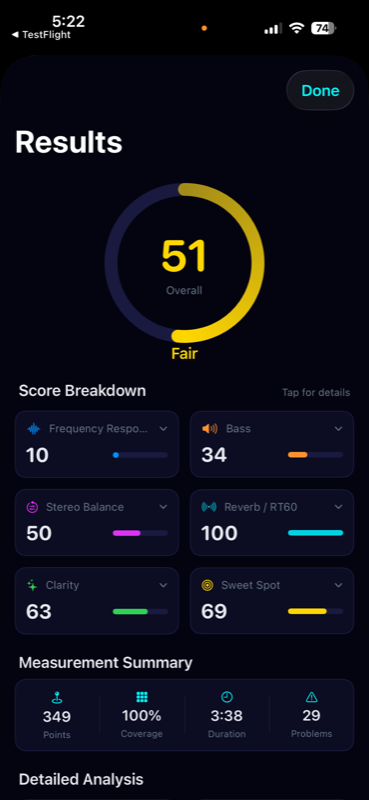
In seconds, get a full 3D acoustic map of your room. Find sweet spots, diagnose problems, and get prioritized recommendations for treatment and EQ.

Features

Unified Scan & Measure

LiDAR room scanning and acoustic measurement happen simultaneously. One walk captures room geometry, speaker positions, and hundreds of measurement points.

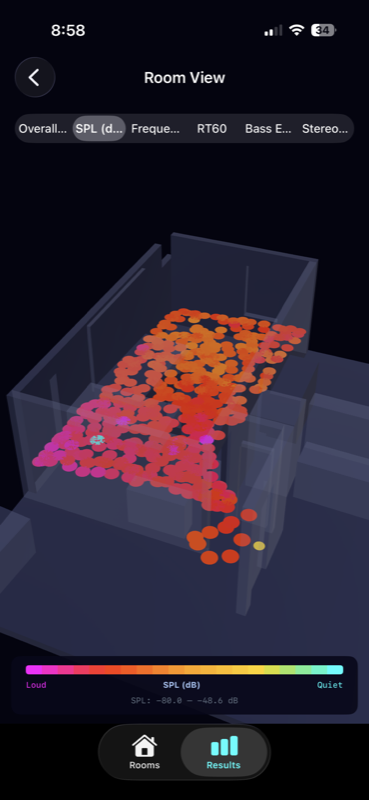
3D Acoustic Heatmap

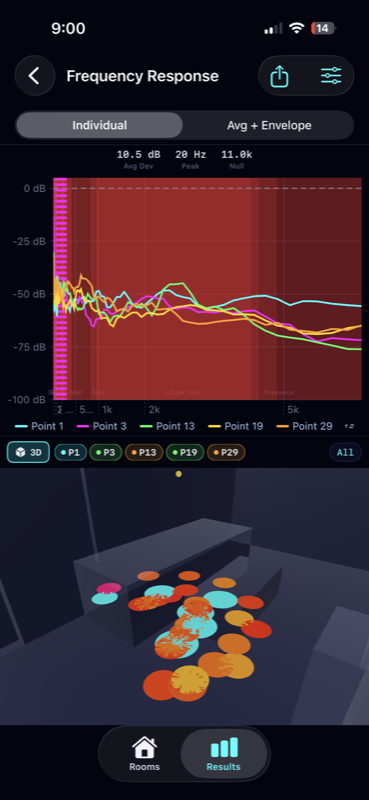
Interactive RealityKit visualization with switchable metrics — overall quality, SPL, frequency flatness, RT60, bass energy, and stereo balance. Tap any point to inspect.

Sweet Spot Finder

Ranks your top listening positions with gold, silver, and bronze badges. Scored on frequency flatness, stereo imaging, reverb, and bass balance.

Problem Detection

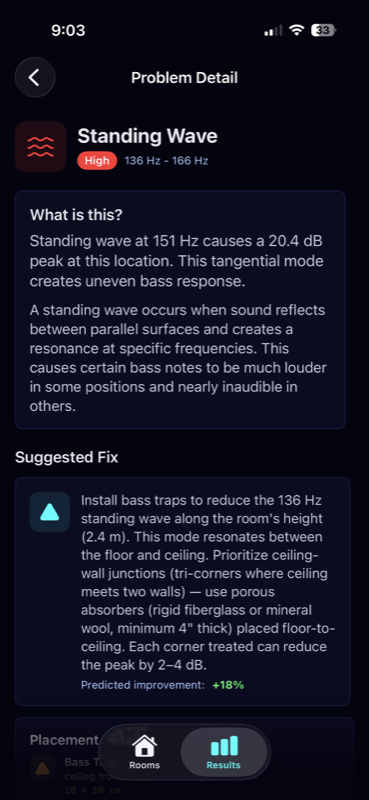
Identifies standing waves, null zones, flutter echoes, comb filters, SBIR, asymmetry, dead spots, and excessive reverb — with severity ratings and visual overlays.

Frequency Response & EQ

Full 20Hz–20kHz response at every point with 1/3 and 1/6 octave smoothing. Auto-generated parametric EQ profiles exportable to miniDSP, Dirac, and REW.

Actionable Recommendations

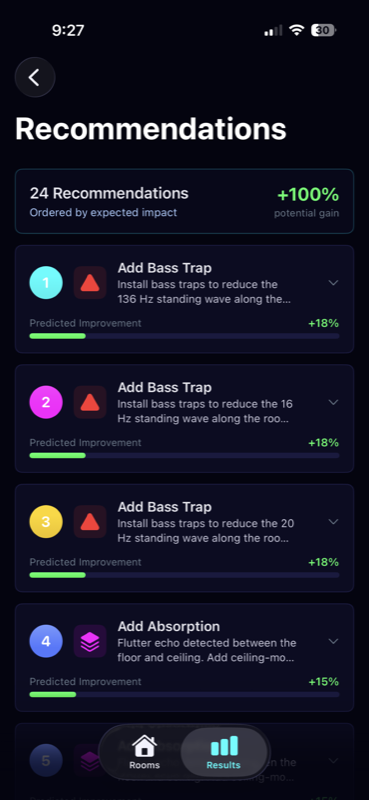
Priority-ranked suggestions — move speakers, add absorption or bass traps, apply EQ, reposition your listening spot — each with predicted improvement percentages.

Session Comparison

Compare before and after measurements with side-by-side or overlay modes. See difference heatmaps and metric deltas to verify improvements.

Export & Share

Export measurement data as CSV, full analysis as JSON, impulse responses as WAV, or generate PDF reports. Share through the standard iOS share sheet.

Precision Measurement

Sample Rate 48 kHz
Sweep Range 20 Hz – 20 kHz
DSP Engine Accelerate / vDSP
Deconvolution FFT + Wiener Regularization
RT60 Method Schroeder Integration
Spatial Interpolation IDW / Kriging
Position Tracking ARKit @ 60 Hz
Metrics SPL, RT60, C50/C80, STI

Professional-Grade Analysis

SonarRoom uses the same impulse response techniques as professional acoustic measurement systems. Sine sweep deconvolution extracts clean impulse responses even in noisy environments. Automatic latency calibration ensures sample-accurate alignment.

During your walk, see live coverage percentage, SPL levels, a real-time spectrum analyzer, and sweep count — all while LiDAR simultaneously maps your room geometry. Every measurement point captures the full acoustic signature tagged with spatial coordinates from ARKit at 60Hz.

Compatibility

Ideal

iPhone 14 Pro+

LiDAR scanner for precise RoomPlan geometry. Best AR tracking accuracy.

LiDAR

Supported

Any iOS 17 Device

Manual 2D room editor with drag-to-draw floor plans. Full measurement and analysis capabilities.

Manual

See Your Sound

Download SonarRoom and discover the acoustic character of every room.

Coming Soon